Introducing Memo 8.0 | BIGGEST Release Ever
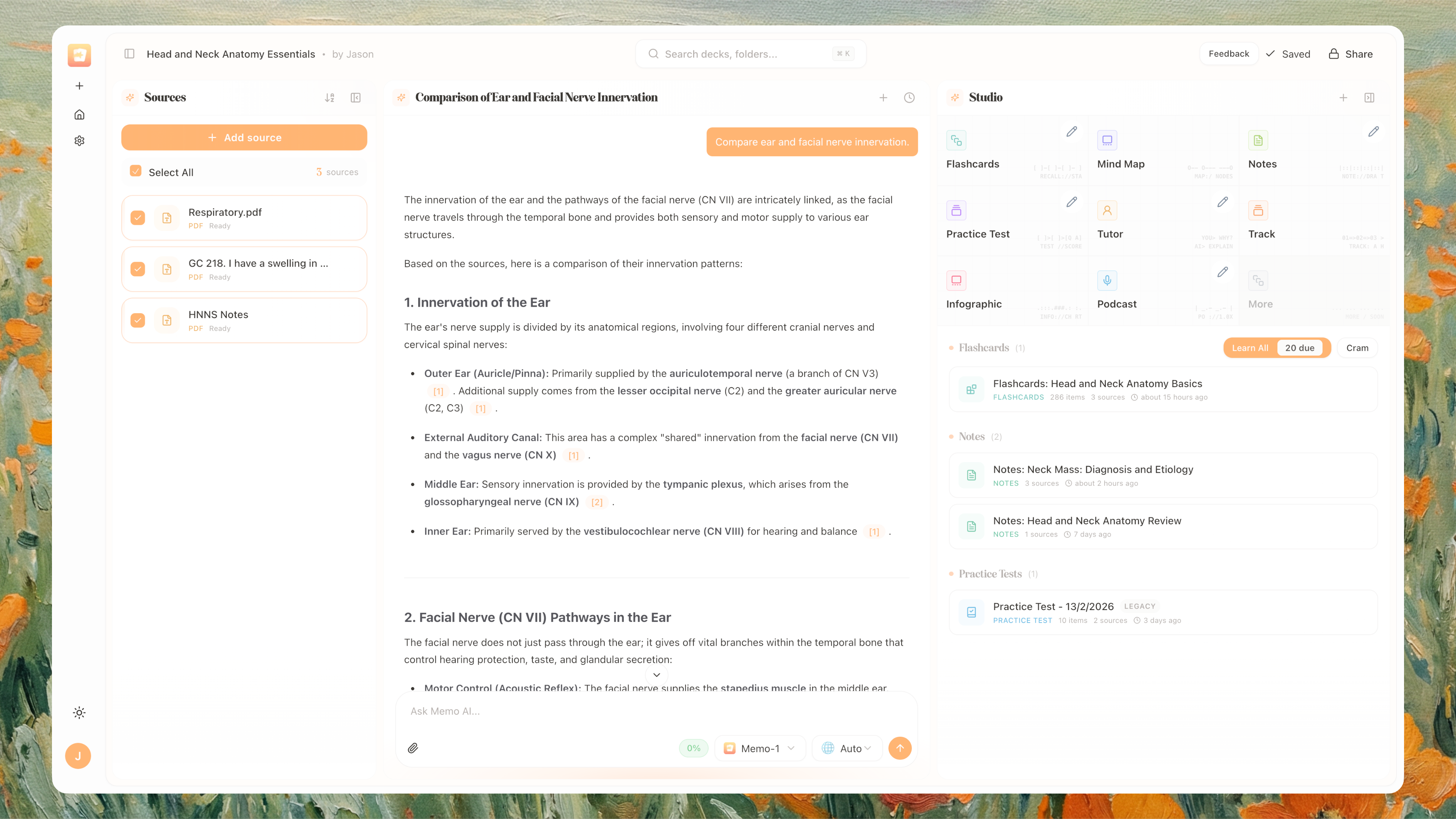
Memo V8 is live. This is our biggest product release so far, with a full redesign across workspace setup, AI generation, source handling, study/review flows, and daily organization.
Memo is now built for broader knowledge work across students, teachers, researchers, and professionals who need one place to collect, understand, and reuse information.
Memo 8.0 is a complete rebuild and rethinking of how Memo works from the ground up. We have been at work over the last 6 months on working towards Memo 8.0. Please let us know of any feedback in this short term to help fine tune some changes as we migrate. Thank you!
Highlights at a Glance
New notebook-first workspace flow
Major Studio upgrade (flashcards, notes, mind maps, tracks, practice tests, tutor, infographics, podcasts)
Major Copilot upgrade (source mentions, context meter, image generation, message editing, model picker)
Major Learn Mode + flashcard workflow overhaul
New universal search and improved dashboard navigation
New energy usage system and clearer limits/reset visibility

What’s New in V8
A clearer Workspace Foundation
Memo now centers around a cleaner “notebook-style” workspace so your content is easier to organize and revisit.
Faster notebook creation and setup
Cleaner layout for multi-project workflows
Better folder and navigation structure
Improved mobile and desktop consistency

Prefer the older interface? You can always revert back to the list view by pressing on the viewing options at the top right corner here:

Studio: One Place to Generate Everything
The Studio experience has been heavily upgraded and now acts as your central generation hub. The entire panel has been completely rebuilt from the ground up in both light mode and dark mode.
Generate:
Flashcards
Notes
Mind maps
Learning tracks
Practice tests
Tutor sessions
Infographics
Podcasts
Plus:
Better progress feedback while generating
Cleaner loading states and status updates
Rename generated outputs
Cancel in-progress generations
“New” indicators for recently created items
For modes with a pencil icon, you can further custom the options within that mode to fine tweak your generation with custom prompts and settings.

Major Source Handling Upgrade
Memo now supports richer knowledge inputs and better source-linked outputs.
You can add sources from:
PDFs
YouTube links
Website links
Pasted text
Also improved:
Source panel clarity and controls
Source sorting and management
Better source-aware citations
Stronger support for mixed-source workspaces

Copilot Chat, Rebuilt for Real Workflows
Chat is now more controllable, source-aware, and usable in longer sessions.
Better model selection experience
Mention specific sources in chat
Edit your own messages
Save useful responses to notes
Add useful chat responses to sources
Better handling for long-context conversations
Clear guidance for older incompatible chat threads


Learn & Review Experience Overhaul
Learn mode is now optimized for multi source learning. Cards from multiple sources will display their relevant snippet (either from PDF or text). The review flow has been redesigned to support different working and learning styles.
Cleaner full-screen review experience
Better answer feedback and guidance
Improved context visibility (pages/sections/timestamps)
Text size controls for readability
Better empty/caught-up states
Per-set due handling improvements

Flashcard & Card Management Upgrades
Managing and editing cards is much more flexible now.
New card editor flow
Better filtering, searching, and sorting
Multiple review/view modes:
Column
List
Toggle
Typing
Flip
View preferences are remembered

Better Search Across Your Workspace
Universal search is now faster and more action-oriented.
Search notebooks, folders, chats, and outputs
Jump directly into relevant items
Trigger key actions from search

Usage Visibility Improvements
We have converted from the existing quota approach to a energy approach which will provide more usage for you across the board. Usage tracking is now easier to understand at a glance.
Clear energy usage breakdown
Remaining balance and activity history
Better reset visibility and planning clarity

Others
We have significantly cleaned up our codebase, refactoring and cleaning more than 100,000 lines of code. This reduces redundancy and eliminates duplicate code and packages, creating a cleaner environment for us to work in. As a result, we have improved navigation speed within the app, enhanced deployment times, and increased overall efficiency.
Playgrounds are now marked as deprecated in main navigation due to lack of usage and its integration now directly in the mindmap mode. Existing playgrounds remain accessible from settings. Core workflows are now focused in the main workspace.
We have fully redesigned our onboarding. Onboarding now adapts to different user types, not just one learning path.Onboarding now adapts to different user types, not just one learning path.
Our landing page has been completely redesigned as well!
The underlying infrastructure of our database, AI processing as well as web frameworks has all been completely reworked and updated to the latest standards for security and functionality.
Why This Release Matters
V8 moves Memo from a set of separate tools into a more unified AI knowledge workspace: one place to collect information, generate outputs, review intelligently, and keep moving across projects.
Memo is currently still co-founded and managed by two medical students in their clinical years. We acknowledge the recent lack of product updates, but all of them have been leading up to this significant release! We can't wait for you to try it out. Please share your feedback by clicking the profile button and selecting "Submit Feedback." As this is a complete rebuild, we expect some bugs, and we would appreciate your help in identifying them. We will fine-tune everything in the coming weeks!
Happy exploring,
Jason
Co-founder of Memo
Explore Memo V8: https://memo.cards/v8