Memo v9: V2 Copilot Agentic Chat, Fixed Practice Test Generation Issues, and more
Memo v9 is one of our biggest AI workspace upgrades so far.
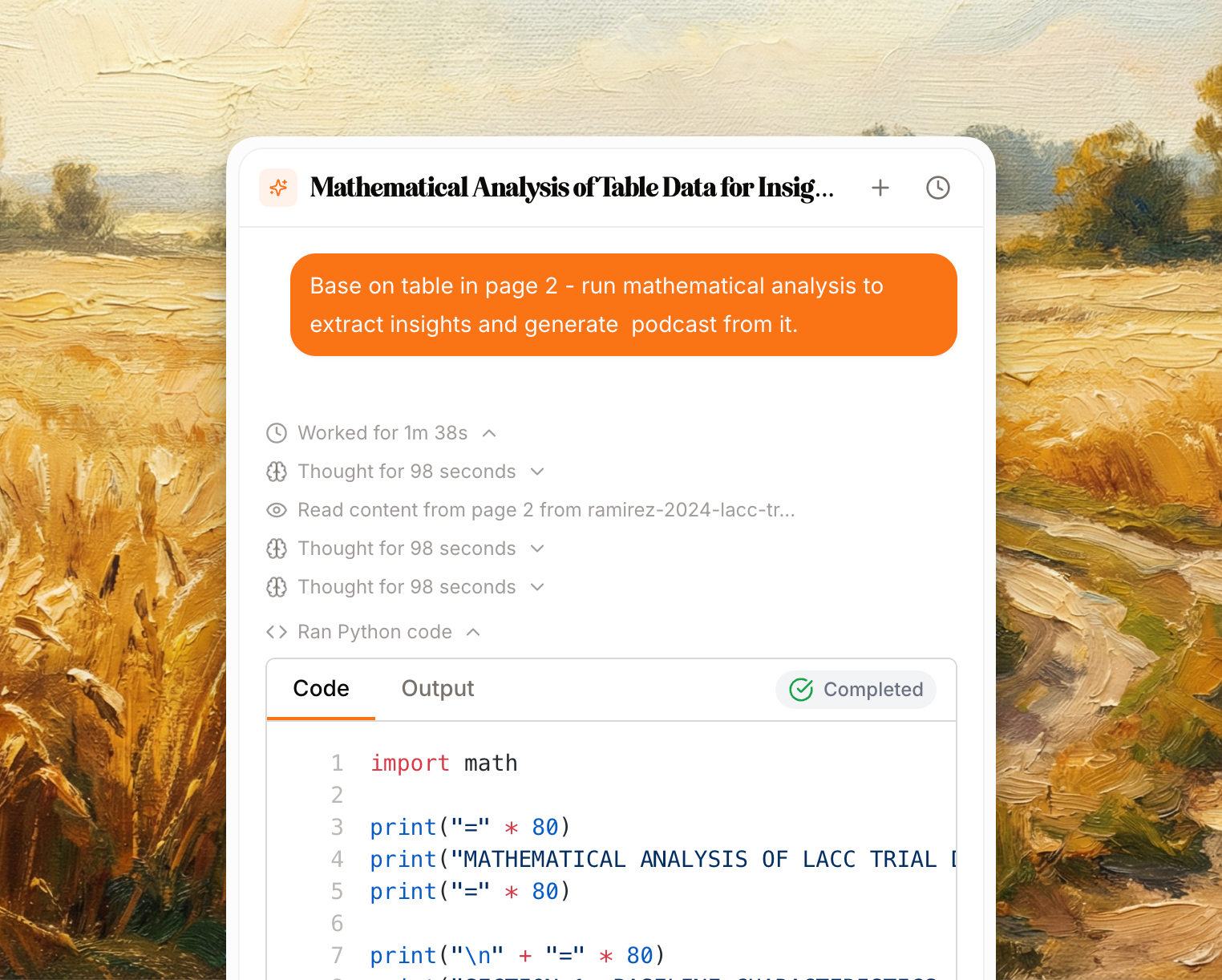
The headline is the new V2 Copilot: a more agentic chat experience that can search through your notebook, reason across sources, start Studio generations, help manage flashcards, analyze images, and even use a Python sandbox for deeper math, statistics, and data analysis.
We also fixed a major practice test generation and grading issue that affected a meaningful number of users. Practice tests should now generate more reliably, produce cleaner marking criteria, and grade answers more consistently.
Around those two headline updates, we shipped improvements to source organization, image sources, flashcards, Learn mode, exports, notebook statistics, and overall reliability.

Highlights
Copilot is now much more agentic inside notebooks.
Copilot can search your sources by exact keywords, quotes, and broader semantic meaning.
Copilot can start Studio generations for notes, practice tests, learning tracks, infographics, and podcasts.
Copilot can generate, edit, delete, and organize flashcards with better confirmation and syncing.
Copilot can run Python in a sandbox for multi-step calculations, statistics, and data-style analysis.
Practice test generation and grading reliability has been significantly improved.
Image uploads are now supported as notebook sources, with OCR and citations.
Source folders help keep large notebooks organized.
Flashcards now have better review stats, merging, exports, and Learn mode controls.
Several production crashes, noisy errors, auth issues, and source/Studio reliability problems were fixed.
V2 Copilot Agentic Chat
Copilot is no longer just a chat box beside your notebook. It now behaves much more like an AI assistant that can inspect, search, act, and help you build study material directly from your sources.

You can ask broader, more natural questions such as:
"Find the section where this paper explains limitations."
"Search my notes for the exact quote about spaced repetition."
"Create a practice test from these sources."
"Turn this into flashcards and add them to my deck."
"Use Python to analyze these numbers."
"Summarize the current page and make study questions from it."
Copilot is now better at choosing the right tool for the job instead of relying only on the initial context it sees.
Copilot Can Start Studio Generations

Copilot can now kick off full Studio generation runs from chat.
You can ask Copilot to create:
Notes
Practice tests
Learning tracks
Infographics
Podcasts
When Copilot starts a Studio generation, Memo creates the Studio output and opens the right workflow instead of forcing you to leave the conversation and manually configure everything from scratch.
Flashcards and mind maps still work directly inside chat, so Copilot can generate quick study material inline when that is the better experience.
Copilot Can Help Manage Flashcards
Copilot now works more naturally with flashcards and flashcard sets.
It can:
Generate standard flashcards and MCQ flashcards.
Add generated cards into Studio flashcard sets.
Inspect existing flashcard sets.
Fetch cards from a specific set.
Suggest edits to existing cards.
Ask for confirmation before editing or deleting cards.
Handle MCQ cards more reliably.
We also fixed the delay where cards added from Copilot could briefly appear as an empty set in Studio. Cards now sync into the notebook UI immediately after being added, while the full page refresh happens in the background.
Inline Copilot flashcards and Flip mode now use the same Anki-style layout as Learn mode: clearer question text, the answer revealed below a divider, and better handling for MCQ explanations.
Python Sandbox For Deeper Analysis

Copilot can now run Python in a sandbox when a problem needs more than simple mental arithmetic.
This is useful for:
Multi-step calculations
Statistics
Data transformations
Checking numeric work
Exploring small datasets
Producing more reliable math-heavy answers
The Python tool runs in an isolated sandbox, shows progress while it starts and cleans up, and returns printed output back into the chat.
Practice Test Generation Issues Fixed
Practice tests received an important reliability fix in Memo v9.
Some users were seeing practice test generation and grading problems, especially around generated marking criteria and short-answer grading. We have tightened the practice test schema, updated how marking criteria are generated and passed into grading, and improved the model routing used for practice test generation.
This should help with:
Practice tests generating successfully more often.
Marking criteria matching what the UI and grader expect.
Short-answer questions receiving cleaner mark schemes.
Grading prompts handling both older and newer practice-test data safely.
More consistent behavior between generated questions, saved tests, and the grading flow.
We also moved more of the practice-test experience through the Studio generation flow, which makes generated tests easier to save, reopen, and manage from the notebook.
Image Sources
Memo now supports image uploads as notebook sources.
You can upload PNG, JPG, and WebP files alongside PDFs and other source types. Memo runs OCR on the image, extracts the text, stores it as source content, and makes it available to search, citations, summaries, flashcards, and Copilot.
This is useful for:
Lecture slides
Screenshots
Diagrams
Scanned notes
Photos of handouts
Image-heavy learning material
Image sources appear in the source panel and can be used by the same notebook intelligence pipeline as other source types.
Source Folders

Large notebooks are easier to organize with source folders.
You can now group sources inside a notebook, move sources between folders, rename folders, reorder folders, and keep uncategorized sources separate. Folder deletion is handled safely by moving sources back to Uncategorized instead of deleting the underlying source material.
This is especially helpful for notebooks with many PDFs, videos, websites, images, and pasted text sources.
Flashcards, Learn Mode, And Review
Memo v9 includes several flashcard and review upgrades.
Notebook statistics are now available from the notebook menu, with spaced repetition charts and progress summaries across flashcard sets. You can see total cards, due cards, overdue cards, mastery, learning state distribution, and per-set progress.
We also added configurable FSRS scheduling settings, so users can tune review behavior such as target retention, max interval, learning steps, relearning steps, and interval fuzz. These settings affect future scheduling and previews.
Other flashcard and Learn improvements include:
Flashcard set merging from Studio.
RemNote flashcard export.
Learn chat persistence per flashcard.
Better Learn chat hydration when switching cards.
Shuffled cram mode.
Learn mode card filters.
Review keyboard shortcut improvements.
Better due-count handling after cards are reviewed.
FSRS grading toggle improvements.
Better newline rendering in toggle-view questions.
Studio And Generation Reliability
Studio generation received a number of reliability and observability improvements.
We improved source ingestion progress, fixed false realtime generation failures, made source and Studio panel widths more stable, and added better tracking for abandoned Studio generations.
We also improved AI model fallbacks for several generation paths, including Gemini and DeepSeek-powered flows, so temporary model/provider issues are less likely to break generation outright.
More Fixes And Polish
This release also includes a broad stability pass across the app:
Fixed refresh-token races that caused noisy production auth errors.
Fixed auth cookie gate and handler allowlist issues.
Fixed older-browser PDF support
Fixed Android Chrome auto-translate crashes.
Fixed deck panel layout crashes when toggling panels.
Fixed non-UUID deck URLs returning crashes instead of clean 404s.
Fixed podcast play AbortError noise.
Fixed source upload and source loading edge cases.
Improved PDF viewer loading states.
Improved Copilot title generation for very large first messages.
Improved chat draft saving behavior.
Added clearer help center guidance for energy usage.
What This Means
Memo v9 makes the notebook feel more alive.
Copilot can now search, reason, act, and generate across your workspace instead of only responding from a small slice of context. Practice tests are more dependable. Sources are easier to organize. Flashcards are easier to manage and review. And a long list of fixes should make the day-to-day experience smoother, especially for larger notebooks.
We are continuing to build Memo toward a more complete AI knowledge workspace: one place to collect sources, understand them, generate useful study material, and review it with active recall.
Happy studying!
Jason
Co-founder of Memo